
MSC Wi-Fi is one of those “sounds simple until you try to buy it” things. There are only two package tiers, but pricing varies by ship and sailing, device rules can surprise people, and “unlimited” still comes with some real-world caveats.
This guide is the big-picture overview – what MSC’s internet packages include, what they typically cost when you pre-purchase, what works well onboard (and what does not), and how to pick the right option without overpaying.
What Changed in 2026?
Two trends are showing up:
- More flash sales (and hard deadlines). MSC regularly discounts Wi-Fi if you buy ahead, and pre-cruise purchases are typically available until 24 hours before sailing.
- Higher sticker prices on many sailings. You’ll notice higher MSC internet pricing on booked 2026 sailings, including examples where sale pricing and “full price” were both notably higher than earlier in the year.
The takeaway is simple: if you think you’ll want Wi-Fi, it’s usually smarter to buy before you board, and keep an eye out for MSC flash sales and booking-time discounts.
The two MSC Wi-Fi packages (what each one actually includes)
MSC sells two internet packages: Browse and Browse & Stream.
Browse Cruise Package
Browse is the “basics” package. It’s best for everyday needs like email, general web browsing, social scrolling, and messaging apps.
What it does not reliably support is the stuff that eats bandwidth – video calls and smooth streaming. MSC’s own promo language often spells that out clearly: it’s browsing and messaging, not video. If you aren’t logging into Zoom calls, watching YouTube or Netflix and sticking mostly to email and web browsing, this is your package. While you can view content that has video, it’s not going to operate at a speed you are used to on land to keep the video smooth.
Browse & Stream Cruise Package
Browse & Stream is the “yes, we actually want video” package. It adds video chat and streaming music and video, and it’s the right tier for FaceTime/Zoom-style calls and YouTube/Netflix-style streaming. This is for the person who cannot imaging life without their streaming video or needs to be on that work Zoom call.
Pricing – what you should expect (pre-purchase, 7-night cruise)
MSC does not publish one universal price list. Pricing shifts by ship, itinerary, and promos. But if you want a realistic budget range for a 7-night cruise when pre-purchased (and not counting discounts), these are solid expectations.
Estimated 7-Day Pricing (Pre-Purchase, 1 Device vs 2 Devices)
(These are ranges – onboard pricing is usually higher.)
| Package Tier | Best For | Estimated 7-Day Cost (1 Device) | Estimated 7-Day Cost (2 Devices) |
|---|---|---|---|
| Browse | Email, WhatsApp (text), social scrolling, web news | $115 – $158 | $215 – $230 |
| Browse & Stream | Video calls, Netflix/YouTube, music streaming | $140 – $165 | $270 – $290 |
We’re giving broad ranges as the pricing is changing and there is differences in prices ship-to-ship. We’ll keep you updated as things continue to change. If your sailing shows meaningfully higher prices than what you are used to, you’re not imagining it – pricing has been moving around.
The “drink package + Wi-Fi” bundle – when it’s a good deal
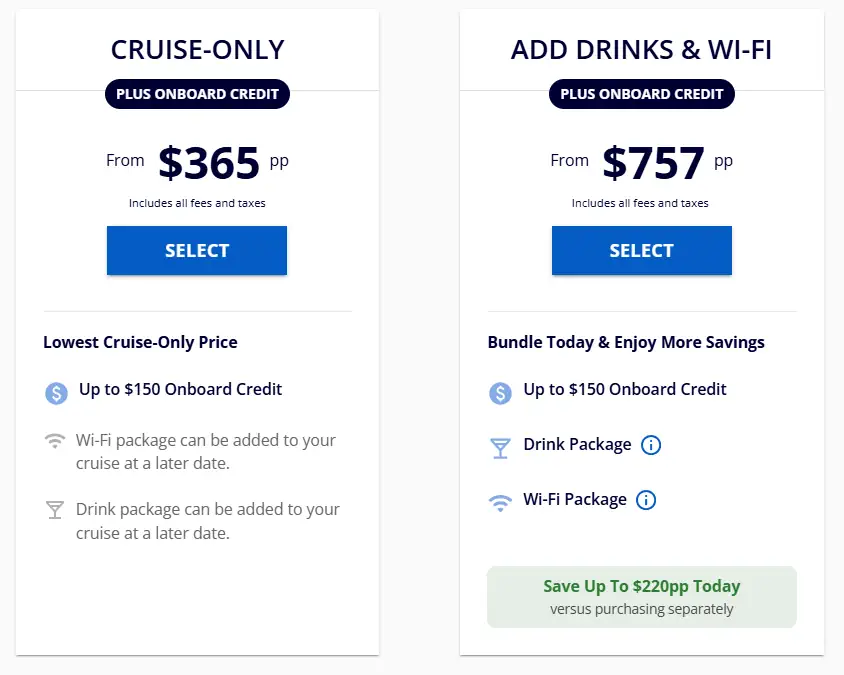
MSC often sells booking promos that combine drinks + Wi-Fi, and when you were already leaning toward a drink package, these can be a sneaky-good value because the Wi-Fi portion typically lines up with Browse.
In MSC promo terms, the Wi-Fi portion is often described along these lines:
- 1 device per guest, up to 2 devices per stateroom
- Entire cruise, unlimited data
- Browse-style usage (web, email, images, WhatsApp chat), no video
- Yacht Club cabins typically do not get “extra” Wi-Fi from the promo because internet is already included in Yacht Club benefits
Trusted-friend rule of thumb:
- If you were truly buying the drink package anyway or will drink enough to cover enough of the cost for drinks plus the WiFi cost, the bundle often makes sense. Use our drink package calculator to figure out how much you might spend.
- If you are not much of a drink package person, it can be cheaper to buy Browse separately and pay as you go for drinks.
Yacht Club Wi-Fi – what’s included (and how upgrades work)
Yacht Club includes internet as part of the experience.
MSC lists unlimited Wi-Fi with browsing on up to two devices as a Yacht Club benefit, and notes you can upgrade to Browse & Stream for an additional fee if you want streaming.
How It Works Onboard
MSC internet is satellite-based, so it’s not the same as home broadband. MSC’s terms also make it clear they cannot guarantee uninterrupted performance, and speeds can vary.
Here’s the practical way to think about it:
- Browse is usually fine for light every-day use (email, browsing, messaging).
- Browse & Stream is the right tier for video calls and streaming, but conditions and congestion still matter, especially on sea days.
Also, “unlimited” is under a Fair Use Policy, which is MSC’s way of saying very heavy use (big downloads, constant background syncing, updates) may be limited to protect the experience for everyone onboard.
The rule that surprises everyone: You can’t switch devices
MSC’s official terms are blunt: once a device is connected and activated, it cannot be switched to another device. Multi-device plans allow simultaneous use on the selected devices, but they still do not allow swapping devices mid-cruise.
Practical advice:
- If you bounce between a phone and a laptop, a 2-device plan often saves frustration.
- If you buy 1 device, pick your true “primary” device before you activate.
How to buy and activate MSC Wi-Fi
MSC promotes pre-purchase and often notes you can buy online up to 24 hours before sailing.
Onboard activation usually follows this flow:
- Connect to the ship Wi-Fi, then go to mscwifi.com (or activate through the MSC for Me app).
- Upgrades are allowed (Browse to Browse & Stream, and adding devices) by paying the difference.
Don’t confuse Wi-Fi with the MSC for Me app
This is an easy money-saver.
The MSC for Me app works via the ship’s Wi-Fi and does not require an internet package. This is the app you need to connect to the ship’s schedule, your folio and information you’ll need onboard. MSC also promotes onboard chat for messaging without a paid internet package. The onboard chat is only for cruisers aged 16 and above.
So if your “internet need” is really just ship info, schedules, and messaging with your travel group, you might not need a paid Wi-Fi package at all. You only really need to pay to get outside of the ship to the broad internet.
Quick troubleshooting if your internet is acting weird
MSC calls out that some apps and configurations may not behave well onboard, including VPNs, and notes that certain device settings can interfere with captive portals.
A simple “start here” checklist we recommend:
- Temporarily disable VPNs
- Turn off automatic updates and large background syncing
- If you cannot reach the login/portal, check settings like Private MAC Address and DHCP configuration (these can trip up ship Wi-Fi portals)
“Hacks” like travel routers or hotspot sharing
Yes, people try to share one paid connection across multiple devices using a travel router or hotspot approach. The results are typically mixed success – some say it worked on their sailing, others say it did not, or was inconsistent.
Here’s the key framing we’d use:
- MSC’s terms emphasize packages are personal/non-transferable and are locked to the activated device, so these approaches can be unreliable and may not align with how the service is intended to work.
- If you try a travel router or hotspot approach, you’re heading down an unsupported path. It might work, it might not, and MSC is unlikely to help you troubleshoot.
- We’d only recommend experimenting if you’re comfortable tinkering with network settings and you’re prepared to shrug and buy the right device count if it fails.
Looking ahead – what we’d recommend for most travelers
- Light internet needs: Browse on 1 device, or skip paid Wi-Fi if you’re happy using MSC for Me onboard.
- Families: 2 devices is often the sweet spot so two people can be connected without a daily “who gets Wi-Fi” debate.
- Remote work or must-stream: Browse & Stream, with realistic expectations and a little prep (pause auto-updates and heavy syncing).
- Yacht Club: Use the included Browse on two devices per person, upgrade if you truly need streaming.